|
|
YYModel==============
[](https://raw.githubusercontent.com/ibireme/YYModel/master/LICENSE) [](https://github.com/Carthage/Carthage) [](http://cocoapods.org/?q= YYModel) [](http://cocoapods.org/?q= YYModel) [](https://travis-ci.org/ibireme/YYModel) [](https://codecov.io/github/ibireme/YYModel?branch=master)
High performance model framework for iOS/OSX.<br/>(It's a component of [YYKit](https://github.com/ibireme/YYKit))
Performance==============
Time cost (process GithubUser 10000 times on iPhone 6):
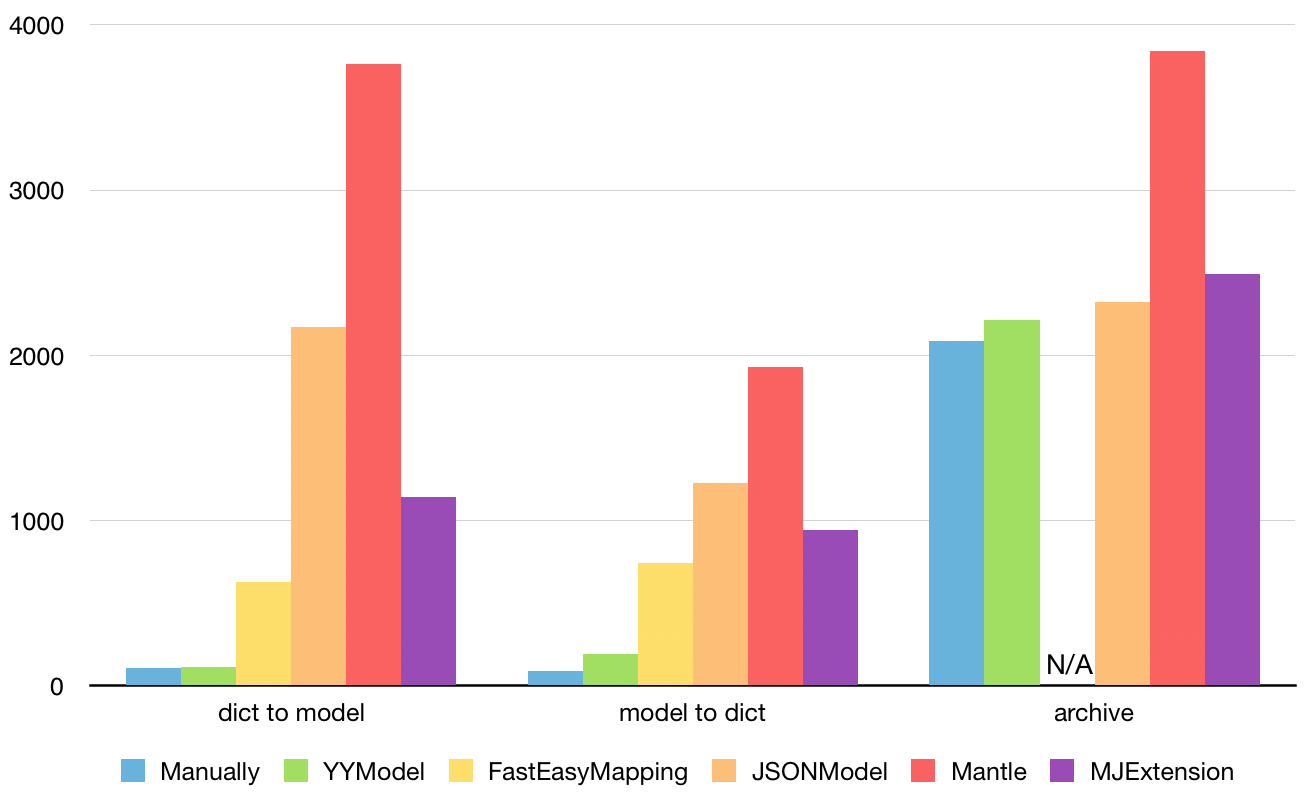
See `Benchmark/ModelBenchmark.xcodeproj` for more benchmark case.
Features==============- **High performance**: The conversion performance is close to handwriting code.- **Automatic type conversion**: The object types can be automatically converted.- **Type Safe**: All data types will be verified to ensure type-safe during the conversion process.- **Non-intrusive**: There is no need to make the model class inherit from other base class.- **Lightwight**: This library contains only 5 files.- **Docs and unit testing**: 100% docs coverage, 99.6% code coverage.
Usage==============
###Simple model json convert
// JSON: { "uid":123456, "name":"Harry", "created":"1965-07-31T00:00:00+0000" }
// Model: @interface User : NSObject @property UInt64 uid; @property NSString *name; @property NSDate *created; @end @implementation User @end
// Convert json to model: User *user = [User yy_modelWithJSON:json]; // Convert model to json: NSDictionary *json = [user yy_modelToJSONObject];
If the type of an object in JSON/Dictionary cannot be matched to the property of the model, the following automatic conversion is performed. If the automatic conversion failed, the value will be ignored.<table> <thead> <tr> <th>JSON/Dictionary</th> <th>Model</th> </tr> </thead> <tbody> <tr> <td>NSString</td> <td>NSNumber,NSURL,SEL,Class</td> </tr> <tr> <td>NSNumber</td> <td>NSString</td> </tr> <tr> <td>NSString/NSNumber</td> <td>C number (BOOL,int,float,NSUInteger,UInt64,...)<br/> NaN and Inf will be ignored</td> </tr> <tr> <td>NSString</td> <td>NSDate parsed with these formats:<br/> yyyy-MM-dd<br/>yyyy-MM-dd HH:mm:ss<br/>yyyy-MM-dd'T'HH:mm:ss<br/>yyyy-MM-dd'T'HH:mm:ssZ<br/>EEE MMM dd HH:mm:ss Z yyyy </td> </tr> <tr> <td>NSDate</td> <td>NSString formatted with ISO8601:<br/> "YYYY-MM-dd'T'HH:mm:ssZ"</td> </tr> <tr> <td>NSValue</td> <td>struct (CGRect,CGSize,...)</td> </tr> <tr> <td>NSNull</td> <td>nil,0</td> </tr> <tr> <td>"no","false",...</td> <td>@(NO),0</td> </tr> <tr> <td>"yes","true",...</td> <td>@(YES),1</td> </tr> </tbody></table>
###Match model property to different JSON key
// JSON: { "n":"Harry Pottery", "p": 256, "ext" : { "desc" : "A book written by J.K.Rowing." }, "ID" : 100010 }
// Model: @interface Book : NSObject @property NSString *name; @property NSInteger page; @property NSString *desc; @property NSString *bookID; @end @implementation Book + (NSDictionary *)modelCustomPropertyMapper { return @{@"name" : @"n", @"page" : @"p", @"desc" : @"ext.desc", @"bookID" : @[@"id",@"ID",@"book_id"]}; } @end
You can map a json key (key path) or an array of json key (key path) to one or multiple property name. If there's no mapper for a property, it will use the property's name as default.
###Nested model
// JSON { "author":{ "name":"J.K.Rowling", "birthday":"1965-07-31T00:00:00+0000" }, "name":"Harry Potter", "pages":256 }
// Model: (no need to do anything) @interface Author : NSObject @property NSString *name; @property NSDate *birthday; @end @implementation Author @end @interface Book : NSObject @property NSString *name; @property NSUInteger pages; @property Author *author; @end @implementation Book @end
### Container property
@class Shadow, Border, Attachment;
@interface Attributes @property NSString *name; @property NSArray *shadows; //Array<Shadow> @property NSSet *borders; //Set<Border> @property NSMutableDictionary *attachments; //Dict<NSString,Attachment> @end
@implementation Attributes + (NSDictionary *)modelContainerPropertyGenericClass { // value should be Class or Class name. return @{@"shadows" : [Shadow class], @"borders" : Border.class, @"attachments" : @"Attachment" }; } @end
### Whitelist and blacklist
@interface User @property NSString *name; @property NSUInteger age; @end @implementation Attributes + (NSArray *)modelPropertyBlacklist { return @[@"test1", @"test2"]; } + (NSArray *)modelPropertyWhitelist { return @[@"name"]; } @end
###Data validate and custom transform
// JSON: { "name":"Harry", "timestamp" : 1445534567 } // Model: @interface User @property NSString *name; @property NSDate *createdAt; @end
@implementation User - (BOOL)modelCustomTransformFromDictionary:(NSDictionary *)dic { NSNumber *timestamp = dic[@"timestamp"]; if (![timestamp isKindOfClass:[NSNumber class]]) return NO; _createdAt = [NSDate dateWithTimeIntervalSince1970:timestamp.floatValue]; return YES; } - (BOOL)modelCustomTransformToDictionary:(NSMutableDictionary *)dic { if (!_createdAt) return NO; dic[@"timestamp"] = @(n.timeIntervalSince1970); return YES; } @end
###Coding/Copying/hash/equal/description
@interface YYShadow :NSObject <NSCoding, NSCopying> @property (nonatomic, copy) NSString *name; @property (nonatomic, assign) CGSize size; @end
@implementation YYShadow - (void)encodeWithCoder:(NSCoder *)aCoder { [self yy_modelEncodeWithCoder:aCoder]; } - (id)initWithCoder:(NSCoder *)aDecoder { self = [super init]; return [self yy_modelInitWithCoder:aDecoder]; } - (id)copyWithZone:(NSZone *)zone { return [self yy_modelCopy]; } - (NSUInteger)hash { return [self yy_modelHash]; } - (BOOL)isEqual:(id)object { return [self yy_modelIsEqual:object]; } - (NSString *)description { return [self yy_modelDescription]; } @end
Installation==============
### CocoaPods
1. Add `pod 'YYModel'` to your Podfile.2. Run `pod install` or `pod update`.3. Import \<YYModel/YYModel.h\>.
### Carthage
1. Add `github "ibireme/YYModel"` to your Cartfile.2. Run `carthage update --platform ios` and add the framework to your project.3. Import \<YYModel/YYModel.h\>.
### Manually
1. Download all the files in the YYModel subdirectory.2. Add the source files to your Xcode project.3. Import `YYModel.h`.
Documentation==============Full API documentation is available on [CocoaDocs](http://cocoadocs.org/docsets/YYModel/).<br/>You can also install documentation locally using [appledoc](https://github.com/tomaz/appledoc).
Requirements==============This library requires `iOS 6.0+` and `Xcode 7.0+`.
License==============YYModel is provided under the MIT license. See LICENSE file for details.
<br/><br/>---中文介绍==============高性能 iOS/OSX 模型转换框架。<br/>(该项目是 [YYKit](https://github.com/ibireme/YYKit) 组件之一)
性能==============处理 GithubUser 数据 10000 次耗时统计 (iPhone 6):

更多测试代码和用例见 `Benchmark/ModelBenchmark.xcodeproj`。
特性==============- **高性能**: 模型转换性能接近手写解析代码。- **自动类型转换**: 对象类型可以自动转换,详情见下方表格。- **类型安全**: 转换过程中,所有的数据类型都会被检测一遍,以保证类型安全,避免崩溃问题。- **无侵入性**: 模型无需继承自其他基类。- **轻量**: 该框架只有 5 个文件 (包括.h文件)。- **文档和单元测试**: 文档覆盖率100%, 代码覆盖率99.6%。
使用方法==============
###简单的 Model 与 JSON 相互转换
// JSON: { "uid":123456, "name":"Harry", "created":"1965-07-31T00:00:00+0000" }
// Model: @interface User : NSObject @property UInt64 uid; @property NSString *name; @property NSDate *created; @end @implementation User @end
// 将 JSON (NSData,NSString,NSDictionary) 转换为 Model: User *user = [User yy_modelWithJSON:json]; // 将 Model 转换为 JSON 对象: NSDictionary *json = [user yy_modelToJSONObject];
当 JSON/Dictionary 中的对象类型与 Model 属性不一致时,YYModel 将会进行如下自动转换。自动转换不支持的值将会被忽略,以避免各种潜在的崩溃问题。<table> <thead> <tr> <th>JSON/Dictionary</th> <th>Model</th> </tr> </thead> <tbody> <tr> <td>NSString</td> <td>NSNumber,NSURL,SEL,Class</td> </tr> <tr> <td>NSNumber</td> <td>NSString</td> </tr> <tr> <td>NSString/NSNumber</td> <td>基础类型 (BOOL,int,float,NSUInteger,UInt64,...)<br/> NaN 和 Inf 会被忽略</td> </tr> <tr> <td>NSString</td> <td>NSDate 以下列格式解析:<br/> yyyy-MM-dd<br/>yyyy-MM-dd HH:mm:ss<br/>yyyy-MM-dd'T'HH:mm:ss<br/>yyyy-MM-dd'T'HH:mm:ssZ<br/>EEE MMM dd HH:mm:ss Z yyyy </td> </tr> <tr> <td>NSDate</td> <td>NSString 格式化为 ISO8601:<br/> "YYYY-MM-dd'T'HH:mm:ssZ"</td> </tr> <tr> <td>NSValue</td> <td>struct (CGRect,CGSize,...)</td> </tr> <tr> <td>NSNull</td> <td>nil,0</td> </tr> <tr> <td>"no","false",...</td> <td>@(NO),0</td> </tr> <tr> <td>"yes","true",...</td> <td>@(YES),1</td> </tr> </tbody></table>
###Model 属性名和 JSON 中的 Key 不相同
// JSON: { "n":"Harry Pottery", "p": 256, "ext" : { "desc" : "A book written by J.K.Rowing." }, "ID" : 100010 }
// Model: @interface Book : NSObject @property NSString *name; @property NSInteger page; @property NSString *desc; @property NSString *bookID; @end @implementation Book //返回一个 Dict,将 Model 属性名对映射到 JSON 的 Key。 + (NSDictionary *)modelCustomPropertyMapper { return @{@"name" : @"n", @"page" : @"p", @"desc" : @"ext.desc", @"bookID" : @[@"id",@"ID",@"book_id"]}; } @end 你可以把一个或一组 json key (key path) 映射到一个或多个属性。如果一个属性没有映射关系,那默认会使用相同属性名作为映射。
在 json->model 的过程中:如果一个属性对应了多个 json key,那么转换过程会按顺序查找,并使用第一个不为空的值。 在 model->json 的过程中:如果一个属性对应了多个 json key (key path),那么转换过程仅会处理第一个 json key (key path);如果多个属性对应了同一个 json key,则转换过过程会使用其中任意一个不为空的值。
###Model 包含其他 Model
// JSON { "author":{ "name":"J.K.Rowling", "birthday":"1965-07-31T00:00:00+0000" }, "name":"Harry Potter", "pages":256 }
// Model: 什么都不用做,转换会自动完成 @interface Author : NSObject @property NSString *name; @property NSDate *birthday; @end @implementation Author @end @interface Book : NSObject @property NSString *name; @property NSUInteger pages; @property Author *author; //Book 包含 Author 属性 @end @implementation Book @end
###容器类属性
@class Shadow, Border, Attachment;
@interface Attributes @property NSString *name; @property NSArray *shadows; //Array<Shadow> @property NSSet *borders; //Set<Border> @property NSMutableDictionary *attachments; //Dict<NSString,Attachment> @end
@implementation Attributes // 返回容器类中的所需要存放的数据类型 (以 Class 或 Class Name 的形式)。 + (NSDictionary *)modelContainerPropertyGenericClass { return @{@"shadows" : [Shadow class], @"borders" : Border.class, @"attachments" : @"Attachment" }; } @end
###黑名单与白名单
@interface User @property NSString *name; @property NSUInteger age; @end @implementation Attributes // 如果实现了该方法,则处理过程中会忽略该列表内的所有属性 + (NSArray *)modelPropertyBlacklist { return @[@"test1", @"test2"]; } // 如果实现了该方法,则处理过程中不会处理该列表外的属性。 + (NSArray *)modelPropertyWhitelist { return @[@"name"]; } @end
###数据校验与自定义转换
// JSON: { "name":"Harry", "timestamp" : 1445534567 } // Model: @interface User @property NSString *name; @property NSDate *createdAt; @end
@implementation User // 当 JSON 转为 Model 完成后,该方法会被调用。 // 你可以在这里对数据进行校验,如果校验不通过,可以返回 NO,则该 Model 会被忽略。 // 你也可以在这里做一些自动转换不能完成的工作。 - (BOOL)modelCustomTransformFromDictionary:(NSDictionary *)dic { NSNumber *timestamp = dic[@"timestamp"]; if (![timestamp isKindOfClass:[NSNumber class]]) return NO; _createdAt = [NSDate dateWithTimeIntervalSince1970:timestamp.floatValue]; return YES; } // 当 Model 转为 JSON 完成后,该方法会被调用。 // 你可以在这里对数据进行校验,如果校验不通过,可以返回 NO,则该 Model 会被忽略。 // 你也可以在这里做一些自动转换不能完成的工作。 - (BOOL)modelCustomTransformToDictionary:(NSMutableDictionary *)dic { if (!_createdAt) return NO; dic[@"timestamp"] = @(n.timeIntervalSince1970); return YES; } @end
###Coding/Copying/hash/equal/description
@interface YYShadow :NSObject <NSCoding, NSCopying> @property (nonatomic, copy) NSString *name; @property (nonatomic, assign) CGSize size; @end
@implementation YYShadow // 直接添加以下代码即可自动完成 - (void)encodeWithCoder:(NSCoder *)aCoder { [self yy_modelEncodeWithCoder:aCoder]; } - (id)initWithCoder:(NSCoder *)aDecoder { self = [super init]; return [self yy_modelInitWithCoder:aDecoder]; } - (id)copyWithZone:(NSZone *)zone { return [self yy_modelCopy]; } - (NSUInteger)hash { return [self yy_modelHash]; } - (BOOL)isEqual:(id)object { return [self yy_modelIsEqual:object]; } - (NSString *)description { return [self yy_modelDescription]; } @end
安装==============
### CocoaPods
1. 在 Podfile 中添加 `pod 'YYModel'`。2. 执行 `pod install` 或 `pod update`。3. 导入 \<YYModel/YYModel.h\>。
### Carthage
1. 在 Cartfile 中添加 `github "ibireme/YYModel"`。2. 执行 `carthage update --platform ios` 并将生成的 framework 添加到你的工程。3. 导入 \<YYModel/YYModel.h\>。
### 手动安装
1. 下载 YYModel 文件夹内的所有内容。2. 将 YYModel 内的源文件添加(拖放)到你的工程。3. 导入 `YYModel.h`。
文档==============你可以在 [CocoaDocs](http://cocoadocs.org/docsets/YYModel/) 查看在线 API 文档,也可以用 [appledoc](https://github.com/tomaz/appledoc) 本地生成文档。
系统要求==============该项目最低支持 `iOS 6.0` 和 `Xcode 7.0`。
许可证==============YYModel 使用 MIT 许可证,详情见 LICENSE 文件。
相关链接==============
[iOS JSON 模型转换库评测](http://blog.ibireme.com/2015/10/23/ios_model_framework_benchmark/)
|

